Latest News

Showing posts with label Cloud Applications. Show all posts

Sunday, August 30, 2020

Top 5 considerations for creating a cloud-based pipeline (Part 2)

This part will cover the last three considerations when creating and running an automated, cloud-based pipeline.

 3. It's All About Continuous Improvement

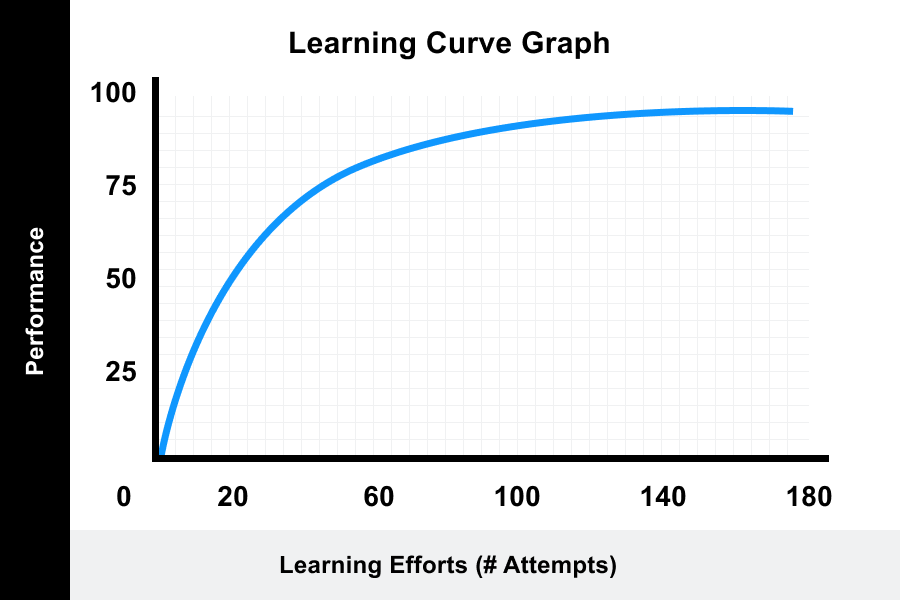
Steep Learning Curves

Before you start creating your cloud-based pipeline, there is some learning you have to do. It might be learning Kubernetes, AWS products, Google Cloud products, Microsoft Azure products, etc. As a community, we must spend time to explore new technologies, learn how to apply them, and how to advance these skills in our industry, even if it takes us weeks to find out and understand how to deploy such technology.
(Source: Valamis)

Keep Fail-Safes in Mind

In general, you should inspect ways your application might fail if a configuration file is changed or a file is incorrectly updated to the pipeline. Therefore, spend time on planning and you can limit the possibility of this happening.

4. Enable Self-Service Features

Rapid Onboarding to New Teams and Pipelines

Adding a role to your architecture should be simple and easy when you onboard new engineers. Spending countless hours accessing things can hinder the process for you and your new team members as they took to start development immediately.

Visibility of Applications

Your team should be provided with tools to monitor their application day-to-day. You can also utilize integrations to run audits on your application's health.

5. Track Your Pipeline, Microservices, and Compliance Policies

The Importance of Dashboards

Having a general-purpose dashboard to manage or view your clusters will allow you to troubleshoot defects and manage clusters' health of all your applications. Having a birds-eye view of all microservices running and an easy dashboard to view will make your life much simpler.

Enforce Policies: Approval Gates, Compliance Checks, and ACLs

Setting up roles for your engineering team and understanding the roles everyone will have to the application is very important. Finally, you should set-up compliance checks to keep track of roles and their access to the application.

Source: Dzone

About us: TMA Solutions was established in 1997 to provide quality software outsourcing services to leading companies worldwide. We are one of the largest software outsourcing companies in Vietnam with 2,500 engineers.

Visit us at https://www.tmasolutions.com/


Wednesday, August 26, 2020

Top 5 considerations for creating a cloud-based pipeline (Part 1)

If you have already monitored your deployments in the development operation, why don't you automate the process behind them? This article will cover the top 5 considerations when creating and running an automated, cloud-based pipeline.


1. Consider Your Business Needs First

Making all of your applications and environments is pivotal to hybrid computing and should be a goal for every company to achieve.

Hybrid cloud is a combination of mixed computing, services, and data storage that can be spun up in person, via private cloud, or via public cloud services. Public cloud services with orchestration between the two platforms and are widely used today with Amazon Web Services (AWS) or Google Cloud Platform.

Am I Hybrid?

If you are adopting a public platform that sends data to a private cloud or leveraging your SaaS applications and transferring data between independent resources - then you are already using hybrid computing. The goal of this model is to combine services and data coming from different places to build a unified, automated, well-managed computing environment.

What do I need to research?

It is necessary for you to define that if your organization needs a private cloud to meet the security demand. For example, those companies in Finance, Law, Healthcare, etc. sectors have to limit what cloud services they can use due to some confidential issues. However, if you are running an e-commerce store, you don’t have to concern so much about it until your business grows and has a larger customer base.

(Source: sdxcentral)

2. Develop Your Cloud-Based Pipeline As Part of Your Apps

Everything As Code: Configurations, Environments, Automations, etc.

To develop a pipeline of your cloud service, you need to set up your configuration and environment files. The bad practices of setting up servers without any configurable way to spin up a new instance immediately will not work when creating automation.

Moreover, you have to model everything in case of any application to be reused and automate everything: scheduled jobs, migration, compiling jobs, etc. By doing this, you will find is easier to maintain the system.

Put Everything in the Source Code

Keeping a repository for your application is key to being able to deploy. Your codebase needs to be set up in different environments in the deploy process for master release, staging, and development branches.

Process, Architecture, Deploy

Everything is a process. It is important to build an architecture that helps your team work better to produce great software. Deployment stages should be quick and easy and shouldn’t be a burden for team to spend so much time to properly release. 

Source: Dzone


About us: TMA Solutions was established in 1997 to provide quality software outsourcing services to leading companies worldwide. We are one of the largest software outsourcing companies in Vietnam with 2,500 engineers.

Visit us at https://www.tmasolutions.com/


Wednesday, July 1, 2020

What is Edge Data Centers?

What Is Edge Data Centers?

Edge data centers are smaller facilities located close to the populations they serve that deliver cloud computing resources and cached content to end users. They typically connect to a larger central data center or multiple data centers. By processing data and services as close to the end user as possible, edge computing allows organizations to reduce latency and improve the customer experience.


Why Do We Need Edge Data Centers?

Latency has always been a problem for data center managers, but in recent years, it’s become a critical concern due to Big Data, the Internet of Things, Cloud and streaming services, and other technology trends. End users and devices demand anywhere, anytime access to applications, services, and data housed in today’s data centers, and latency is no longer tolerable. As a result, organizations across many industries are establishing edge data centers as a high-performance and cost-effective way to provide customers with content and functionality.


Key Characteristics of Edge Data Centers

Edge data centers may be defined differently by different data center professionals based on their roles, industries, or priorities, and due to the relative infancy of edge data centers as an established trend. However, most definitions share the following key characteristics:

Local: Edge data centers are placed near the areas they serve and are managed remotely.

Small: Edge data centers have the same components of a traditional data center but packed into a much smaller footprint.

Part of a larger deployment: An edge data center is one of many in a complex network including a central enterprise data center.

Mission critical: Edge data centers house mission-critical data, applications, and services for edge-based processing and storage.


Top Use Cases of Edge Computing

Currently, about 10% of data is created and processed outside a centralized data center or Cloud, but by 2025, this figure will reach 75% (Gartner, 2018). Here are some of the top use cases for edge computing.

Autonomous vehicles: Self-driving vehicles can collect, process, and share data in real time, making transportation safer.

Smart cities: Real time gathering and analysis of data on traffic, utilities, and infrastructure allows city officials to immediately respond to problems.

Manufacturing: Equipping industrial IoT devices with data storage and computing capabilities allows for better predictive maintenance and energy efficiency.

Financial institutions: With reduced latency for high-volume banking firms, trading algorithms are executed quicker, potentially making more profit.

Telemedicine: Healthcare providers can have immediate access to critical patient data collected from personal health monitoring devices and fitness bands.

Augmented reality: AR technology, which requires real time data processing, is being deployed by retail chains to create a more immersive in-store shopping experience.

AI virtual assistants: The processing burden of household virtual assistants is distributed locally for improved performance and reduced latency.

Video monitoring: Video cameras, especially those equipped with motion detection or facial tracking, record massive amounts of data that can be collected and processed locally.

Gaming: Multi-player gaming relies on high bandwidth, low latency, and local matchmaking, leading to the emergence of cloud gaming.

Content delivery: Content cached at the edge can be delivered to the end user in a matter of single milliseconds.


Source: Sunbirddcim

About us: TMA Solutions was established in 1997 to provide quality software outsourcing services to leading companies worldwide. We are one of the largest software outsourcing companies in Vietnam with 2,500 engineers

Wednesday, June 24, 2020

Vietnam accelerate cloud computing for digital transformation

The Ministry of Information and Communication launched a campaign to promote digital transformation using cloud computing.


With regards to the post-coronavirus period, Vietnam is steadily recovering its economy, experts say digital transformation will aid enterprises adopt a more efficient and cost-effective business model.

Cloud computing is regarded as one of the most fundamental parts of this process, the demand for this has been increasing in the past few years.


Added to that, Minister Nguyen Manh Hung expressed that domestics enterprises have aced telecommunications infrastructure and a similar accomplishment must be achieved to further refine such infrastructure.

He focused great emphasis on the critical role of cloud infrastructure development, given the idea that digital infrastructure is basically the combination of telecommunications infrastructure and cloud computing.

Vietnam is one of the pioneer countries to have adopted a set of criteria and technical specifications for cloud computing services and it is expected that many more Vietnamese cloud providers will reach such standards in the future.

Source: Nhan Dan

About us: TMA Solutions was established in 1997 to provide quality software outsourcing services to leading companies worldwide. We are one of the largest software outsourcing companies in Vietnam with 2,500 engineers

Visit us at https://www.tmasolutions.com/

Friday, November 24, 2017

Three questions to ask before you migrate apps to public cloud


Many firms assume public cloud is the best place to host all apps, but that's not always the case. Before you drink the cloud Kool-Aid, ensure it's a cost-effective move.
The public cloud is an attractive option for many enterprises because of its scalability, speed and pay-as-you-go model. But those benefits don't apply to all workloads -- in fact, some applications could perform poorly or cost more in the cloud.
This means, before you migrate apps to a public infrastructure as a service (IaaS) platform, you need to ensure the move will provide business value.
First, understand what your motivation is for a cloud migration. Do you want lower costs? Do you need more flexibility? Some businesses move to the cloud too fast, only because they assume they should, which could cause issues down the road.
Before you take the big step and migrate apps to the public cloud, start with these three questions:
1. How do I choose which apps to migrate?


Assess your application, and review its requirements -- for both performance and compliance -- to determine if it is a good candidate for the public cloud. Check if the application has any specific network needs or dependencies. Unless you also migrate the systems on which your app depends, including databases, latency could be an issue. Also, review an application's design before you migrate it to the cloud; those apps that frequently read and write to storage systems, for example, could end up costing you more off premises. In general, applications that are "bursty" or have frequent spikes in demand are a good fit for public cloud, while applications that run on a more consistent, predictable basis might be better left in-house.
Cloud providers offer tools, such as Azure Cloud Migration Assessment and Amazon Web Services (AWS) Application Discovery Service, to simplify the assessment process. AWS, Azure and Google also offer pricing calculators to estimate cloud costs.
In addition, determine whether the cloud provider you choose meets your security and compliance requirements. Look at where their data centers are located, especially if you have sensitive data that needs to adhere to strict compliance standards.
2. Which migration approach should I take?

After you decide which applications to migrate, determine a migration method. Two common options are rehost, also known as lift and shift, and refactor, also known as rearchitect.
The lift-and-shift process takes less time to accomplish than refactoring, since developers don't have to change the application's architecture or design -- they just move it as is. But while lift and shift is a simpler approach, it also has drawbacks. For example, if you migrate apps to IaaS without any modifications, they might not be able to take advantage of a key cloud feature: autoscaling. As a result, those applications will still operate the same way they would on an on-premises system -- at peak -- and the enterprise will pay for more cloud storage and compute resources than they actually use.
This makes rearchitecting, or refactoring, a better option for some legacy apps -- even if it's more time-consuming and costly. Lift and shift, on the other hand, is best for cloud disaster recovery.
Do not migrate apps to the cloud too quickly -- start with apps that are the most cloud-ready and that have the least amount of sensitive data. After you run a pilot, test the application, get a feel for the process and then move onto more critical applications.
3. What are my options for cloud migration tools?
Migration is a complex process that comes with risk and the potential for high costs. There are both cloud provider-native and third-party tools that can aid organizations through the process. If an enterprise needs to move large amounts of data to the cloud, it can also perform an offline data migration. This requires an organization to store its data on physical disks and then ship the disks to its cloud provider. While this method might seem old-school, it can be more cost-effective than a migration via a network if you have terabytes of data. Offline data migration services from top cloud providers include AWS Snowball, AWS Snowmobile, Google Transfer Appliance and Azure Import/Export.

Tags

Recent Post